
 Published on Mar 30, 2026
How to Check Jharbhoomi Bhu Naksha Online in 2026 (Step-by-Step Guide)
In 2026, the Jharkhand government has upgraded the Jharbhoomi Portal, making it faster and more advanced. Now, land records are more accurate and available in real-time.
The process of checking Bhu Naksha (land map) has become very simple. You can now view your plot map and download it as PDF within a few clicks using your mobile or computer.
Citizens of Jharkhand can now access almost all land-related services online, including Khata, Khatiyan, Register-II, Mutation Status, and Bhu Naksha.
If you want to check your land map online, follow the step-by-step process below.
⭐ How to Check Jharbhoomi Bhu Naksha Online in 2026
Step 1: Visit Official Website
Open your browser and go to:
=> jharbhoomi.jharkhand.gov.in
Step 2: Click on “Bhu Naksha”
On the homepage, you will see the Bhu Naksha option.
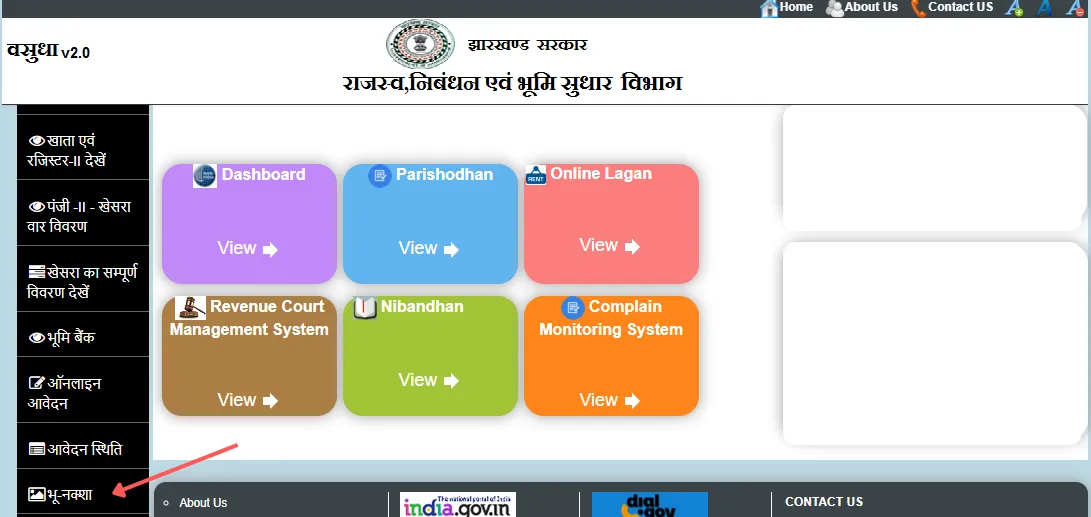
Click on it to open the digital land map page.
Step 3: Select Location Details
Select the following details:
- District
- Circle (Anchal)
- Halka
- Mauza (Village)
After selecting, the map will automatically load.
Step 4: Click on Your Plot
Find your plot on the map and click on it.
You will see:
- Plot number
- Khata number
- Owner details
- Land type
- Area
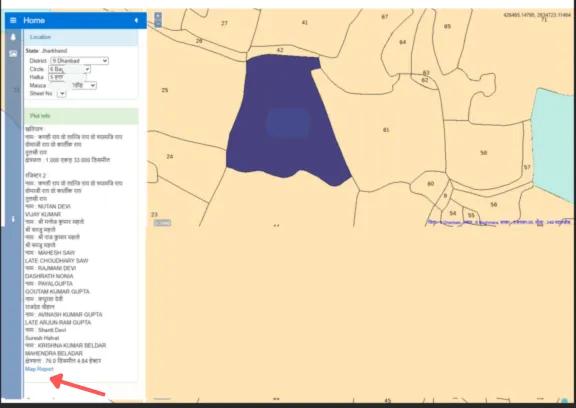
Step 5: Click on “Map Report”
In the plot info section, click on Map Report.
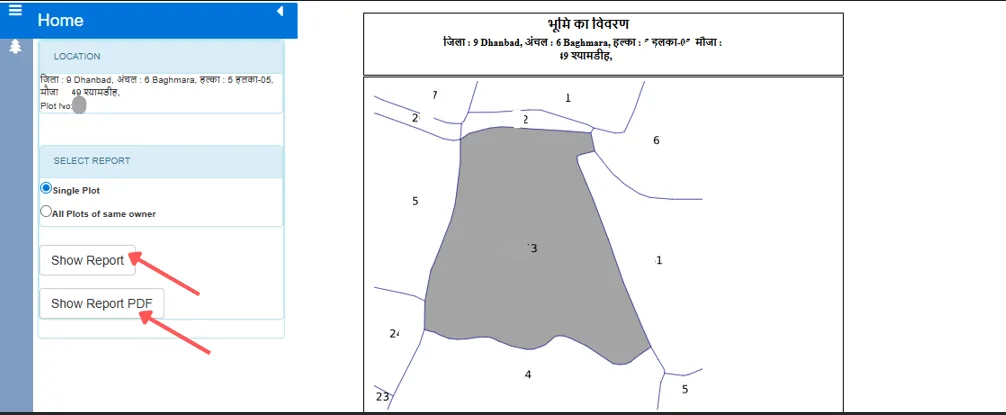
Step 6: View or Download PDF
You will get two options:
- Show Report (View online)
- Show Report PDF (Download PDF)
Select any option as per your need.
⭐ Why Bhu Naksha is Important?
- Verify land boundary
- Check plot location
- Required before buying or selling land
- Useful for mutation process
- Helps resolve land disputes
⭐ Benefits of Checking Bhu Naksha Online
- Available from home
- No need to visit offices
- Save time and money
- Downloadable PDF
- Accurate plot-wise information
⭐ Related Jharbhoomi Guides
| Service | Link |
|---|---|
| How to Check Jharbhoomi Register-II Online in 2026 | View Register-II |
| How to Check Jharbhoomi Bhu Naksha Online in 2026 (Step-by-Step Guide) | View Land Map (Bhu Naksha) |
| How to Check Bihar Bhu Naksha Online in 2026 | View Bihar Land Map |
| Check Jharbhoomi Mutation Status 2026 (Dakhil Kharij Application Status) | Check Mutation Status |
| How Jharbhoomi Helps Prevent Land Fraud in Jharkhand – Complete Guide | Learn About Land Fraud Prevention |
| Jharbhoomi Official Website | Visit Official Website |
❓ Frequently Asked Questions (FAQ)
Q1. Is Jharbhoomi Bhu Naksha free?
=> Yes, it is completely free to use.
Q2. Can I check using mobile?
=> Yes, the portal is mobile-friendly.
Q3. How to download map PDF?
=> Click on Map Report and select Show Report PDF.
Q4. What if plot is not visible?
=> Select correct location details or contact local office.
⭐ Conclusion
In 2026, checking Jharbhoomi Bhu Naksha online has become very easy and convenient.
You can view your land map and download it anytime from home without visiting any office.
⭐ Important Aahar Jharkhand (Ration Card) Guides
- Jharkhand Ration Card Status 2026 – What Does “Pending at DSO” Mean & How to Check
- Jharkhand Ration Card e-KYC 2026 – How to Complete Online from Home
- Check Jharkhand Ration Card Status 2026 Using Acknowledgement Number
- Jharkhand Ration Card New Rules 2026 – Eligibility, Benefits and Updates
- Apply for Jharkhand New Ration Card Online 2026 – Complete Application Process
- Add New Member in Jharkhand Ration Card Online 2026 – Step-by-Step Guide
- Download Jharkhand Ration Card Online in 2026 (PDF Guide)